Search This Blog

Friday, December 26, 2014

Query to monitor Alert Log report of last n days.

SET linesize 500 pagesize 500
col RECORD_ID FOR 9999999 head ID
col MESSAGE_TEXT FOR a120 head Message
col ORIGINATING_TIMESTAMP for a20 head Date


SELECT to_char(originating_timestamp,'DD-MM-RR HH24:MI:SS') "Time", message_text
FROM X$DBGALERTEXT
WHERE originating_timestamp > systimestamp - &Days
AND
regexp_like(message_text, '(TNS-|ORA-|error)');


Enjoy :)
Gaurav Sahi

Tuesday, May 27, 2014

How to access Oracle Apps R12/11i on Linux Machine (Mozilla Firefox)


How to access Oracle Apps 11i/R12 forms from Linux VM or Linux machine?

In you to access forms from Linux client, Three steps are installed (You can skip first if Mozilla is installed on your Linux client) –


1. Install Mozilla Browser

2. Install JRE on client machine (JRE version to install will depend on Server configuration, 
Identify which version of JRE you need on client machine
– For 11i/R12 : Login to server as application o.s. user (applmgr), set environment variable and run grep plugin $CONTEXT_FILE   (If you get output like 1.5.0_13 you need JRE 1.5.0 patchset 13, if its 1.5.0_10 you need 1.5.0 patchset 10; or for 1.4.2_04 you need 1.4.2 patchset 4 )

3. Use JRE installed above on client machine in Browser (Mozilla) Plugin 


1. Install FireFox Mozilla
– Download Mozilla for Linux from http://www.mozilla.com/en-US/firefox/all.html#en  firefox-2.0.0.7.tar.gz
– “gunzip -d firefox-2.0.0.7.tar.gz” (You will get unzipped file with name as firefox-2.0.0.7.tar)
– Extract tar file as “tar -xvf  firefox-2.0.0.7.tar”
– This will create directory called “firefox” which is under you will see executable called “firefox“; Use this executable to start FireFox on Linux machine.


2. Install JRE on client machine
–Download JRE  5.0 Update 10 (change this as per your server plugin version shown above; I am on 12.0.0 hence 1_5.0.10) for Linux from http://java.sun.com/products/archive/j2se/5.0_10/index.html  ”jre-1_5_0_10-linux-i586-rpm.bin”


– ”chmod 755 jre-1_5_0_10-linux-i586-rpm.bin”


– ./jre-1_5_0_10-linux-i586-rpm.bin  (You will be asked to accept license agreement , click enter and when prompted to accept license enter Yes)


– This will install jre 1.5.10 in linux machine under /usr/java  and plugin is installed under /usr/java/jre1.5.0_10/plugin/i386/ns7/libjavaplugin_oji.so


3. Configure JRE Plug-in in browser

– Go to Mozilla FireFox plug-in directory which is $location_where_you_unziped_firefox_directory/plugins and create soft link like

– ln -s /usr/java/jre1.5.0_10/plugin/i386/ns7/libjavaplugin_oji.so ./libjavaplugin_oji.so


Thursday, April 10, 2014

Oracle Applications (11.5.10.2) Installation on Red Hat Enterprise Linux

 
Before start installation:
 
1. The installation of E-Business Suite R11 needs minimum of 2G swap, secure Linux disabled and the following package groups installed:
  • X Window System
  • GNOME Desktop Environment
  • Editors
  • Graphical Internet
  • Server Configuration Tools
  • Development Tools
  • Administration Tools
  • System Tools
I strongly suggest , choose “install everything” option while you are making Redhat Enterprise Linux installation. Its little hard to try install-add some rpms and other tools on Redhat Enterprise Linux.In this article, i assume that you have been installed everything.
2.The installation size of Oracle E-Business Suite R11 is:
  • 57 GB for a fresh install with a production database:
Application tier file system – 26 GB
Database tier file system (fresh install with a production database) – 31 GB
  • 91 GB for a fresh install with a Vision Demo database.
Application tier file system – 26 GB
Database tier file system (fresh install with a production database) – 65 GB
3. Create stage area folder:
You need to setups file for can make Oracle E-Business Suite R11 installation. You can use edelivery.oracle.com site for can download Oracle E-Business Suite the lastest version.
PS: It’s not avaliable to download Oracle E-Business Suite R11 setup file from edelivery.oracle.com for a now. If you need setups file please log a SR(service request) or please contact with your local office)
Oracle E-Business Suite R11 setup files almost have 31 GB size.
You can create stage folder by following:
Oracle E-Business Suite R11 installation manual – Page 1-14 Setting Up the Stage Area
Mainly;
Put all the files under one directory (i.e. /data/R11stage), and extract all the files under the same directory and give it 777 permission For instance:
[root@test]# mkdir /data/R11Stage
 
[root@test]# chown –R 777 /data/R11Stage
 
[root@test]# cd /data/R11Stage
For Start Here DVD create below:
mkdir startCD
For APPL_TOP DVD create below:
mkdir oraApps
For RDBMS DVD create below:
mkdir oraDB
For Tools DVD create below:
mkdir oraiAS
For Databases DVD create below:
mkdir oraAppDB
Before start to installation, i strongly suggest check below:
MD5 Checksums for 11i10.2 Rapid Install Media [ID 316843.1] note for can observe you have any problem wiht your stage or not(Corrupted zip etc)
 
Ensure that /etc/hosts and /etc/oraInst.loc are set right:
[oracle@erp ~]$ cat /etc/hosts
# Do not remove the following line, or various programs
# that require network functionality will fail.
127.0.0.1       localhost.localdomain localhost
192.168.1.50    erp.freeoraclehelp.com erp
[oracle@erp ~]$ cat /etc/oraInst.loc 
inventory_loc=/oracle/erp/R12/oraInventory
inst_group=oinstall
[oracle@erp ~]$ 

Create OS User:
# groupadd oinstall -g 2000
# useradd -g oinstall -u 2000 oracle
# chown -R oracle:oinstall /oracle
 
Set Kernel Parameters:
[root@erp ~]#  tail /etc/sysctl.conf
# Oracle Recommendations for Apps  #
kernel.shmall = 2097152
kernel.shmmax = 4294967295
kernel.shmmni = 4096
kernel.sem = 256 32000 100 142
fs.file-max = 131072
net.ipv4.ip_local_port_range = 10000 65000
kernel.msgmni = 2878
kernel.msgmax = 8192
kernel.msgmnb = 65535
net.core.rmem_default = 262144
net.core.wmem_default = 262144
net.core.rmem_max = 4194304
net.core.wmem_max = 262144
# Oracle Recommendations for Apps  #

[root@erp ~]# sysctl -p

Increase user limits: Add the following to /etc/security/limits.conf
  * hard nofile 65535
  * soft nofile 4096
  * hard nproc 16384
  * soft nproc 2047

Add the following to /etc/profile
if [ $USER = "oracle" ]; then 
        if [ $SHELL = "/bin/ksh" ]; then 
              ulimit -p 16384 
              ulimit -n 65536 
        else 
              ulimit -u 16384 -n 65536 
        fi 
fi 

Ensure the following RPMs are installed: compat-db-4.1.25-9
compat-gcc-32-3.2.3-47.3
compat-gcc-32-c++-3.2.3-47.3
compat-libgcc-296-2.96-132.7.2
compat-libstdc++-296-2.96-132.7.2
compat-libstdc++-33-3.2.3-47.3
xorg-x11-deprecated-libs-devel-6.8.1-23.EL
xorg-x11-deprecated-libs-6.8.1-23.EL
openmotif-2.1.30-x

[root@erp RPM_OEL4]# ls -ltr
total 8
-rwxr-xr-x  1 root root 5814 Feb  5  2011 p4198954_40_LINUX.zip
[root@erp RPM_OEL4]# pwd
/dumps/ERP/11i/RPM_OEL4
[root@erp RPM_OEL4]# unzip p4198954_40_LINUX.zip 
Archive:  p4198954_40_LINUX.zip
  inflating: compat-libcwait-2.1-1.i386.rpm  
  inflating: compat-oracle-rhel4-1.0-5.i386.rpm  
  inflating: README.txt              
[root@erp RPM_OEL4]# rpm -ivh compat-*
Preparing...                ########################################### [100%]
   1:compat-oracle-rhel4    ########################################### [ 50%]
   2:compat-libcwait        ########################################### [100%]
[root@erp RPM_OEL4]#  

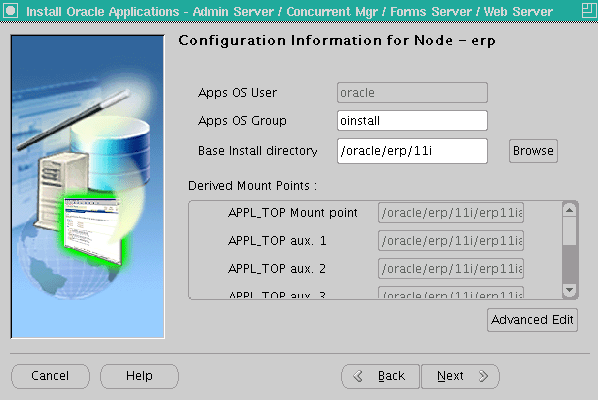
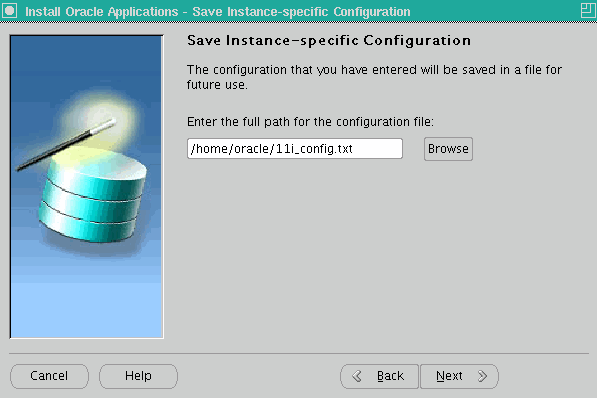
Installation


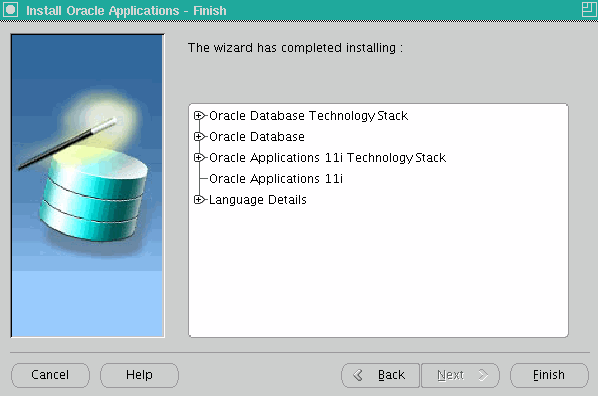
Oracle Applications (Apps) 11i (11.5.10.2) Installation on Linux (OEL4/RHEL4) 001
Oracle Applications (Apps) 11i (11.5.10.2) Installation on Linux (OEL4/RHEL4) 002
Oracle Applications (Apps) 11i (11.5.10.2) Installation on Linux (OEL4/RHEL4) 003
Oracle Applications (Apps) 11i (11.5.10.2) Installation on Linux (OEL4/RHEL4) 004
Oracle Applications (Apps) 11i (11.5.10.2) Installation on Linux (OEL4/RHEL4) 005
Oracle Applications (Apps) 11i (11.5.10.2) Installation on Linux (OEL4/RHEL4) 006
Oracle Applications (Apps) 11i (11.5.10.2) Installation on Linux (OEL4/RHEL4) 007
Oracle Applications (Apps) 11i (11.5.10.2) Installation on Linux (OEL4/RHEL4) 008
Oracle Applications (Apps) 11i (11.5.10.2) Installation on Linux (OEL4/RHEL4) 009
Oracle Applications (Apps) 11i (11.5.10.2) Installation on Linux (OEL4/RHEL4) 010
Oracle Applications (Apps) 11i (11.5.10.2) Installation on Linux (OEL4/RHEL4) 011
Oracle Applications (Apps) 11i (11.5.10.2) Installation on Linux (OEL4/RHEL4) 012
Oracle Applications (Apps) 11i (11.5.10.2) Installation on Linux (OEL4/RHEL4) 013
Oracle Applications (Apps) 11i (11.5.10.2) Installation on Linux (OEL4/RHEL4) 014
Oracle Applications (Apps) 11i (11.5.10.2) Installation on Linux (OEL4/RHEL4) 015
Oracle Applications (Apps) 11i (11.5.10.2) Installation on Linux (OEL4/RHEL4) 016
Oracle Applications (Apps) 11i (11.5.10.2) Installation on Linux (OEL4/RHEL4) 017
Oracle Applications (Apps) 11i (11.5.10.2) Installation on Linux (OEL4/RHEL4) 018
Oracle Applications (Apps) 11i (11.5.10.2) Installation on Linux (OEL4/RHEL4) 019
Oracle Applications (Apps) 11i (11.5.10.2) Installation on Linux (OEL4/RHEL4) 020
Oracle Applications (Apps) 11i (11.5.10.2) Installation on Linux (OEL4/RHEL4) 021

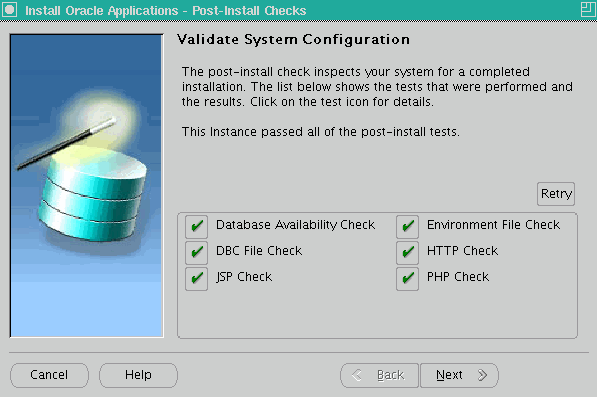
Post-Install Checks

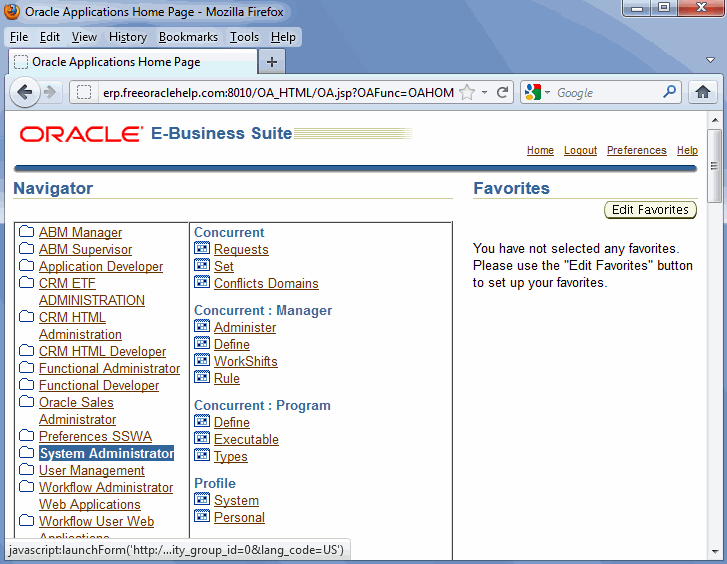
Once installation is complete, verify the logins at http://erp.freeoraclehelp.com:8010. Here are the default passwords.
Database:
SYS/change_on_install
SYSTEM/manager
Application Schema passwords:
APPS Schema: APPS/APPS
GWYUID User: APPLSYSPUB/PUB
Guest User: GUEST/ORACLE
Application Users:
SYSADMIN/SYSADMIN
MFG/WELCOME
OPERATIONS/WELCOME
SERVICES/WELCOME
MRC/WELCOME
HRMS/WELCOME
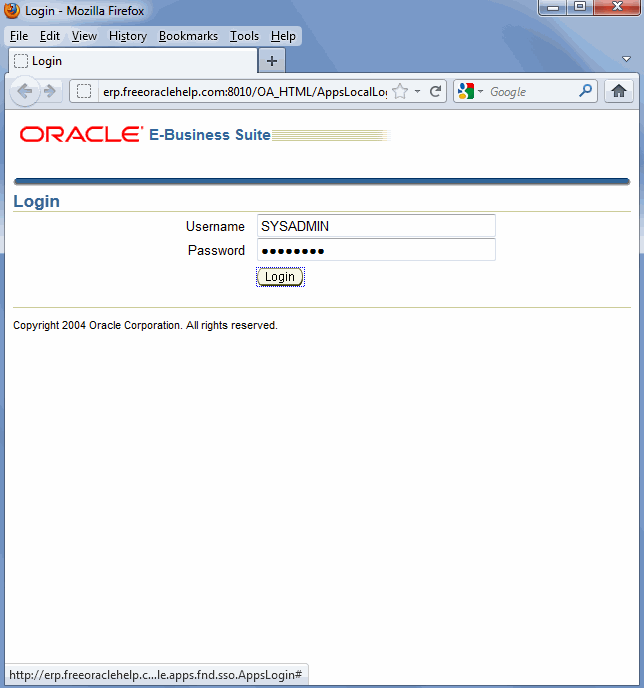
Oracle Applications (Apps) 11i (11.5.10.2) Installation on Linux (OEL4/RHEL4) 022
Oracle Applications (Apps) 11i (11.5.10.2) Installation on Linux (OEL4/RHEL4) 023
Oracle Applications (Apps) 11i (11.5.10.2) Installation on Linux (OEL4/RHEL4) 024
Oracle Applications (Apps) 11i (11.5.10.2) Installation on Linux (OEL4/RHEL4) 026

Admin scripts


RDBMS ORACLE_HOME Control scripts
(located under <RDBMS ORACLE_HOME>/appsutil/scripts/<CONTEXT_NAME>)
Control Script
Functionality
addbctl.sh Control database server
addlnctl.sh Control Oracle Net listener for the database server


RDBMS ORACLE_HOME Install scripts
(located under <RDBMS ORACLE_HOME>/appsutil/install/<CONTEXT_NAME>)
Install Script
Functionality
adsvdlsn.sh Start Oracle Net listener during installation
adcrdb.sh Start database and create database control files
addbprf.sh Set profile option values
adsvdcnv.sh Perform character set conversion and licensing tasks
adsvdb.sh Start database during installation
 
 
COMMON_TOP Control scripts
(located under <COMMON_TOP>/admin/scripts/<CONTEXT_NAME>)

Control Script
Functionality
Node
adalnctl.sh Control Oracle Net8 listener for Applications services All application tier server nodes
adstrtal.sh Start all Applications server processes All application tier server nodes
adstpall.sh Stop all Applications server processes All application tier server nodes
adfrmctl.sh Control Forms server Forms server node
adfmcctl.sh Control Forms Metrics Client Forms server node
adfmsctl.sh Control Forms Metrics Server HTTP server node
adtcfctl.sh Control TCF SocketServer Concurrent processing server node
adcmctl.sh Control Concurrent managers Concurrent processing server node
adrepctl.sh Control Reports server Concurrent processing server node
adapcctl.sh Control Apache processes HTTP server node
jtffmctl.sh Control Oracle fulfillment server HTTP server node


COMMON_TOP Install scripts
(located under <COMMON_TOP>/admin/install/<CONTEXT_NAME>)

Install Script
Functionality
Node
adsvalsn.sh Start Net8 listener processes for Applications services All application tier server nodes
adsvfrm.sh Start Forms server during install Forms server node
adsvfmc.sh Start Forms server during install Forms server node
adsvfms.sh Start Forms metric server during install HTTP server node
adsvcm.sh Start Concurrent manager during install Concurrent processing server node
adsvtcf.sh Start TCF server during install Concurrent processing server node
adsvrep.sh Start Reports server during install Concurrent processing server node
adsvapc.sh Start Apache server during install HTTP server node
jtfsvfm.sh Start Fulfillment server during install HTTP server node
 

Tuesday, October 15, 2013

Retrieve Apps password in R12 or Forgot Apps Password in R12

Steps to retrieve forgotten apps password in R12

Step 1 : login to DB-Node

sqlplus / as sysdba

STEP 2 : Create Function for to decrypt the encrypted password


SQL> create FUNCTION apps.decrypt_pin_func(in_chr_key IN VARCHAR2,in_chr_encrypted_pin IN VARCHAR2)
RETURN VARCHAR2
AS
LANGUAGE JAVA NAME 'oracle.apps.fnd.security.WebSessionManagerProc.decrypt(java.lang.String,java.lang.String) return java.lang.String';
/

Function created.

STEP 3 : (Query for password)


SQL> select ENCRYPTED_FOUNDATION_PASSWORD from apps.fnd_user where USER_NAME='GUEST';


Output

ENCRYPTED_FOUNDATION_PASSWORD
--------------------------------------------------------------------------------
ZG37E123746712BDB2D99E048FE44AE662F2713E2EDB443391BABA0414CADDB7A2E6DD45BBAFA7270A663E5EEBA837F5548A

STEP 4:

SELECT apps.decrypt_pin_func('GUEST/ORACLE','ZG37E123746712BDB2D99E048FE44AE662F2713E2EDB443391BABA0414CADDB7A2E6DD45BBAFA7270A663E5EEBA837F5548A') from dual;


Output

APPS.DECRYPT_PIN_FUNC('GUEST/ORACLE','ZG37E123746712BDB2D99E048FE44AE662F2713E2EDB443391BABA0414CADDB7A2E6DD45BBAFA7270A663E5EEBA837F5548A')
--------------------------------------------------------------------------------
DEMONSTRATE

STEP 5: (Test apps password)

SQL> conn apps/DEMONSTRATE;
Connected.

CHEERS :)

Monday, July 29, 2013

Query to find all current Oracle Application user logged in R12 & 11i

There are 2 Queries:-

1) SELECT DISTINCT icx.session_id,
icx.user_id,
fu.user_name,
fu.description
FROM icx_sessions icx, fnd_user fu
WHERE disabled_flag != 'Y'
AND icx.pseudo_flag = 'N'
AND (last_connect +
DECODE (fnd_profile.VALUE ('ICX_SESSION_TIMEOUT'),
NULL, limit_time,
0 , limit_time,
fnd_profile.VALUE ('ICX_SESSION_TIMEOUT')/60) / 24) > SYSDATE
AND icx.counter < limit_connects
AND icx.user_id = fu.user_id;


2) SELECT DISTINCT ic.disabled_flag,
fu.user_name User_Name,
fr.RESPONSIBILITY_KEY Responsibility,
fu.user_id,
fu.description,
fu.employee_id,
ic.responsibility_application_id,
ic.responsibility_id,
ic.org_id,
ic.function_type,
ic.counter,
ic.first_connect,
ic.last_connect,
ic.nls_territory,
ic.time_out,
fr.menu_id,
fr.responsibility_key
FROM fnd_user fu,
fnd_responsibility fr,
icx_sessions ic
WHERE fu.user_id = ic.user_id
AND fr.responsibility_id = ic.responsibility_id
AND ic.disabled_flag ='N'
and IC.RESPONSIBILITY_ID is not null
AND ic.last_connect > sysdate - (ic.time_out/60)/96;

Monday, June 10, 2013

How to clean FND_NODES table in Oracle Applications

Step 1: Always apply the latest cloning patches to avoid all the bugs and fixes

Step 2: SQL> EXEC FND_CONC_CLONE.SETUP_CLEAN;
COMMIT;
EXIT;
It will delete all old data from the table.

Step 3: Run AutoConfig on all tiers, firstly on the DB tier and then the APPS tiers to repopulate the required system tables.

Thursday, January 17, 2013

How to migrate responsibility / menu / form (personalizations) from one ERP apps (11i / R12) instance to another using FNDLOAD?

Below are the commands

===========================
RESPONSIBILITY
===========================

For migrating a responsibility we need the responsibility key value.

Steps to get the RESPONSIBILITY KEY VALUE

Login as Sysadmin
System Administrator -> Security : Responsibility -> Define
Press F11 -> Enter the Responsibility Name -> Get the responsibility key value from the Responsibility Key Text Field.

To Download
FNDLOAD apps/[APPS_PWD] 0 Y DOWNLOAD $FND_TOP/patch/115/import/afscursp.lct [give some name].ldt FND_RESPONSIBILITY RESP_KEY=”[RESPONSIBILITY_KEY_VALUE]“

To Upload
FNDLOAD apps/[APPS_PWD] 0 Y UPLOAD $FND_TOP/patch/115/import/afscursp.lct [name given above].ldt

===========================
MENU
===========================

To Download
FNDLOAD apps/[APPS_PWD] 0 Y DOWNLOAD $FND_TOP/patch/115/import/afsload.lct [give some name].ldt MENU MENU_NAME=”[MENU_NAME]“

To Upload
FNDLOAD apps/[APPS_PWD] 0 Y UPLOAD $FND_TOP/patch/115/import/afsload.lct [name given above].ldt

=======================
FORMS PERSONALIZATIONS
=======================

For migrating the forms personalizations we need the function name that is associated with the form.
Steps to get the form function name (eg. Users Form)
Login as Sysadmin
System Administrator -> Security : User -> Define
Once the form opens up
On the Tool Bar Click Help -> Diagnostics -> Custom Code -> Personalize
This will open a new form with function name. This is the value we require.
You can perform simillar step for any form that you want to migrate by opening the form to be migrated.

To Download
FNDLOAD apps/[APPS_PWD] 0 Y DOWNLOAD $FND_TOP/patch/115/import/affrmcus.lct [give some name].ldt FND_FORM_CUSTOM_RULES function_name=”[FUNCTION_NAME]“

To Upload
FNDLOAD apps/[APPS_PWD] 0 Y UPLOAD $FND_TOP/patch/115/import/affrmcus.lct [give some name].ldt


Wednesday, October 3, 2012

WAS error while installing UPK Professional Release 11.1

Hello Everybody,

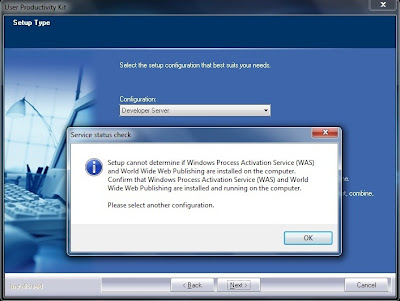
While starting the User Productivity Kit Professional Release 11.1 installtion on Windows 2003 R2 Server with SP2 the most common error comes is:-


To resolve the issue we nned to install IIS on Windows 2003. Following are the steps:-
 
  1. Click Start, point to Control Panel, and then click Add or Remove Programs.
  2. In Add or Remove Programs, click Add/Remove Windows Components.
  3. In the Windows Components Wizard, under Components, select Application Server.
  4. After the wizard completes the installation, click Finish.
  5. Click Next.
 
NOTE:- For thus you need Windows Server 2003 CD
 
After that you can continue with the UPK Server installation.
 

Monday, September 17, 2012

R12 installation 64 bit on OEL 5 update 5(From Scratch to END)


1. Download R12 64 bit software from

https://edelivery.oracle.com (create your account if you using this site first time).
Select product E-business suite on 64 Bit.

Oracle E-Business Suite Release 12.1.1 Media Pack for Linux x86-64-bit ; download first 39 cd. and unzip them on the host where you want to perform the installation.


2. Set Up Stage Area Directory

$ cd /u01
$ mkdir StageR12

3. Unzip the Files


  • $ cd /u01/download

  • $ unzip -d /u01/StageR12 <ZipFile>


  • Prerequisites before Starting Installation:-

    a. Make sure these package has been installed manually:

    openmotif21-2.1.30-11.EL5.i386
    xorg-x11-libs-compat-6.8.2-1.EL.33.0.1.i386

    These two rpm can be download from here:
    http://oss.oracle.com/projects/compat-oracle/files/Enterprise_Linux/
    For Update 1 or 2:
    binutils-2.17.50.0.6-6.0.1.x86_642

    For Update 3:
    binutils-2.17.50.0.6-9.0.1.x86_642

    For Update 4 (5.4) or higher, see workaround listed below in the 'After Installing or Upgrading' section.
    The following packages must be installed from the Oracle Linux 5 or RHEL 5 distribution media:
    gcc-4.1.2-14.el5.x86_64
    gcc-c++-4.1.2-14.el5.x86_64
    glibc-2.5-18.i686 (32-bit)
    glibc-2.5-18.x86_64
    glibc-common-2.5-18.x86_64
    glibc-devel-2.5-18.i386 (32-bit)
    glibc-devel-2.5-18.x86_64
    libgcc-4.1.2-14.el5.i386
    libgcc-4.1.2-14.el5.x86_64
    libstdc++-devel-4.1.2-14.el5.i386
    libstdc++-devel-4.1.2-14.el5.x86_64
    libstdc++-4.1.2-14.el5.i386
    libstdc++-4.1.2-14.el5.x86_64
    make-3.81-1.1.x86_64
    gdbm-1.8.0-26.2.1.i386
    gdbm-1.8.0-26.2.1.x86_64
    libXp-1.0.0-8.1.el5.i386
    libXp-1.0.0-8.1.el5.x86_64
    libaio-0.3.106-3.2.i386
    libaio-0.3.106-3.2.x86_64
    libgomp-4.1.2-14.el5.x86_64
    sysstat-7.0.0-3.el5.x86_64
    util-linux-2.13-0.45.el5.x86_64
    compat-libstdc++-296-2.96-138.i386
    compat-libstdc++-33-3.2.3-61.i386


    b. Kernel Settings
    Edit the /etc/sysctl.conf
    Parameter Value
    kernel.semmsl 256*
    kernel.semmns 32000*
    kernel.semopm 100*
    kernel.semmni 142*
    kernel.shmall 2097152
    kernel.shmmax Half the size of the physical memory (in bytes), and at least 2147483648
    kernel.shmmni 4096
    kernel.msgmax 8192
    kernel.msgmnb 65535
    kernel.msgmni 2878
    fs.file-max 65536
    net.ipv4.ip_local_port_range 10000 65000**
    net.core.rmem_default
    262144
    net.core.rmem_max 262144
    net.core.wmem_default 262144
    net.core.wmem_max 262144


    c. Verify that the /etc/hosts
    There should be information of hostname with IP address.


    d. Modifying the Number of Open File Descriptors
    Edit /etc/security/limits.conf
    *
    hard nofile 65535
    * soft nofile 4096
    * hard nproc 16384
    * soft nproc 2047

    e. OS Library Patch for Oracle HTTP Server (on Oracle Linux 5 and RHEL 5 only)
    Download and apply the patch 6078836 from My Oracle Support to fix an issue with the Oracle HTTP Server (missing libdb.so.2) bundled


    Create User & Group:-

    a) Create group dba and user oracle & .

    # groupadd dba
    #useradd -g dba oracle


    b) Create directory

    # mkdir -p /d01/oracle
    # chown -R oracle:dba /d01/oracle
    # chmod -R 775 /d01/oracle

    INSTALLATION PROCESS:-

    a. Login as applmgr and change directory to /stage/StageR12/StartCD/Disk1/rapidwiz
    b. Run Rapidwiz ...Type './rapidwiz' and press Enter
    c.  A screen appears which takes you through the installation steps .....Click Next on first 3 screens.
    d. Enter the CSI number, Metalink account and country and click Next else Ignore that.
    e. Choose create new configuration and Click Next
    f. Choose a port pool and Click Next
    g. Choose Database type Vision/fresh, Specify a SID,verify host and domain.....
    Give the username as applmgr and group as dba and specify the directory as /oraDB and Click Next
    h. Select Suite Licensing and Click Next
    i. Click Next on the Next 2 screens to accept license products and country specific functionalities.
    j. Choose Database character set as UTF8 and click Next
    k. Verify the host,domain and specify the base directory as /oraAPP and instance directory as /oraAPP/inst and Click Next
    l. Click Next ...The rapidwiz verifies and validates the system configuration and notifies if there are any errors...All the checks have to return a GREEN
    tick mark if passed. Correct the errors if there are any RED cross marks and restart the rapidwiz.
    m. Click Next and then Yes on the next screen to start the installation .
    n. Once the installation is finished it performs post installation checks and notifies if there are any errors. It should return all GREEN marks if successfully installed
    o. Click on Finish and that Ends the Installation Steps

    Common Error after Installation:-

    a) rw-50015 error - HTTP is not responding


    ln -s /usr/lib/libgdbm.so /usr/lib/libdb.so.2

    but in my case it just created a broken link.

    I had to use this instead:
    ln -s /usr/lib/libgdbm.so.2 /usr/lib/libdb.so.2

    Restart the Application and database server.

    Start rapid installation again with $rapidwiz -restart


    Tuesday, August 28, 2012

    How to Create Readonly User (for specific Schema) in Oracle Database

    1) create user bolinf_readonly identified by readonly;

    2) select username from dba_users
        where username like '%BOLINF%';

    3) grant create session to BOLINF_READONLY

    4) grant select any table to BOLINF_READONLY

    5) create or replace trigger log_on_after_bolinf
        after logon ON BOLINF_READONLY.SCHEMA
        BEGIN
        EXECUTE IMMEDIATE 'alter session set CURRENT_SCHEMA = BOLINF';
        END;

    Enjoy. . . . .
    :) 

    Thursday, July 19, 2012

    Login page error: 404 - The url /OA_HTML/AppsLogin not found

    This blog speaks about the Login Page Issue on R12.1.1 instance.

    Suddenly the login page was throwing an error - 404 /OA_HTML/AppsLogin was not found on the server

    The access_log shows no errors. error.log from $LOG_HOME/ora/10.1.3/Apache shows

    [Tue Jan 18 11:27:51 2011] [error] [client 123.238.255.152] [ecid: 1295330271:127.0.0.1:10897:0:2,0] File does not exist: /oracle/CLON/inst/apps/CLON_obaserver/portal/OA_HTML/AppsLogin
    [Tue Jan 18 11:27:54 2011] [error] [client 123.238.255.152] [ecid: 1295330274:127.0.0.1:10897:0:3,0] File does not exist: /oracle/CLON/inst/apps/CLON_obaserver/portal/OA_HTML/AppsLogin
    [Tue Jan 18 11:30:10 2011] [error] [client 123.238.255.152] [ecid: 1295330410:127.0.0.1:10899:0:2,0] File does not exist: /oracle/CLON/inst/apps/CLON_obaserver/portal/OA_HTML/AppsLogin


    I recreated the jar files using adadmin

    and compiled the jsp using

    cd $FND_TOP/patch/115/bin
    perl ojspCompile.pl --compile --flush -p 20 -log /tmp/ojspc_error2.log
    Nothing worked out.

    Fix:
    This problem occurred because wsrp_service.wsdl was owned by root but the services were being started by applmgr.

    Ensure that the file
    $ORA_CONFIG_HOME/10.1.3/j2ee/oacore/application-deployments/oacore/html/server-wsdl/wsrp_service.wsdl

    it shows it is owned by root. Somebody started the services of Apps as root user.

    Changed the owner of the file to Apps Owner.

    Restarted the service.

    Wednesday, April 25, 2012

    Oracle Application Object Library (FND): Active Users Data Collection


    1. Login to Oracle E-Business Suite
    2. Select the responsibility "Oracle Diagnostics Tool"
    3. Select application "Oracle Application Object Library" from the "Application" list of values
    4. Click the "Advanced" tab
    5. Scroll down to group "Data Collection"
    6. Select test name "Active Users"
    7. Input Parameters (* required)

    Responsibility Id (LOV) *

    1. Output contains

    Product Installation Status and Patchset Level

    Parameters

    Key Profile Options

    Self Service Web Application Users

    Forms-Based Products Users

    Concurrent Programs Users

    References


    Thursday, April 12, 2012

    Find SID from Concurrent Program Request ID

    SELECT sid
    FROM v$session
    WHERE paddr LIKE
    (SELECT addr
    FROM v$process
    WHERE spid =
    (SELECT oracle_process_id
    FROM fnd_concurrent_requests
    WHERE request_id = TO_NUMBER(<your request id>)
    )
    );

    Friday, March 23, 2012

    ORA-04063: package body "APPS.AP_ACCTG_DATA_FIX_PKG" has errors

    Symptoms

    After applying GDF patch 11787050:R12.AP.B or any other patch requiring undo accounting, running the script "ap_undo_acctg.sql" throws the below error:

    ERROR
    -----------------------
    ORA-04063: package body "APPS.AP_ACCTG_DATA_FIX_PKG" has errors
    ORA-06508: PL/SQL: could not find program unit being called:
    "APPS.AP_ACCTG_DATA_FIX_PKG"
    ORA-06512: at line 38

    When trying to compile "APPS.AP_ACCTG_DATA_FIX_PKG", following errors are shown:

    AP_ACCTG_DATA_FIX_PKG PLS-00394: wrong number of values in the INTO list of a FETCH statement

    Cause

    A technical dependency has been introduced between the
    files apacpays.pls, apacpayb.pls and apgdfalb.pls with the
    bugfix 9716573.

    Due to the technical dependency introduced, the AP_ACCTG_DATA_FIX_PKG does not compile when there's a descrepancy between the datafix package and other packages.
    Hence results in the package being invalid.

    This is explained in the below internal bug:
    Internal BUG 11772495 - RCA: REMOVING TECHNICAL DEP BETWEEN APACPAYB.PLS & APGDFALB.PLS

    Solution

    1. Download and review the readme and pre-requisites for Patch 11772495:R12.AP.B (to fix the package apacpayb.pls) and Patch.12582979:R12.AP.B (to upgrade the version of apgdfalb.pls).

    2. Ensure that you have taken a backup of your system before applying
    the recommended patch.

    3. Apply the patch in a test environment.
    4. Confirm the following file versions:
    ap patch/115/sql apacpayb.pls 120.12.12010000.28
    ap patch/115/sql apacpays.pls 120.6.12010000.10
    ap patch/115/sql apgdfalb.pls 120.1.12010000.39
    ap patch/115/sql apgdfals.pls 120.1.12010000.13
    You can use the commands like the following:
    strings -a $XX_TOP/filename |grep '$Header'

    5. Check if the AP_ACCTG_DATA_FIX_PKG is now valid and retest running the script.

    6. Migrate the solution as appropriate to other environments.

    Thursday, January 19, 2012

    Step by Step Create read only user in oracle

    Step to Create Read only User in Oracle

    create role read_only; --- Give new Role name


    Oracle Auditing is configured to use the Database Audit Trail, type the following command:

    grant select on DBA_AUDIT_TRAIL to read_only;

    create user gaurav identified by password; -- Create User


    Oracle Auditing is configured to use the XML Audit Trail, type the following command:


    grant select on V_$XML_AUDIT_TRAIL to gaurav;

    grant connect to gaurav;

    grant read_only to gaurav;

    SQL> spool table.sql


    SQL> SELECT 'GRANT SELECT ON APPS.' ||TABLE_NAME || ' TO read_only;' FROM DBA_TABLES WHERE OWNER='APPS';
    'GRANTSELECTONAPPS.'||TABLE_NAME||'TO read_only;'
    ----------------------------------------------------------------------
    GRANT SELECT ON APPS.HYA_PERSONAL_VAR TO read_only;
    GRANT SELECT ON APPS.HFM_ERRORLOG TO read_only;
    GRANT SELECT ON APPS.HSX_DATASOURCES TO read_only;

    'GRANTSELECTONAPPS.'||TABLE_NAME||'TO read_only;'
    ----------------------------------------------------------------------
    GRANT SELECT ON APPS.HSV_ACTIVITY_USERS TO read_only;

    GRANT SELECT ON APPS.HSV_ACTIVITY_SESSIONS TO read_only;
    GRANT SELECT ON APPS.HSV_USERS_ON_SYSTEM TO read_only;
    GRANT SELECT ON APPS.HSV_ACTIVITY_KILL_USERS TO read_only;

    GRANT SELECT ON APPS.HSV_ACTIVITY_NO_ACCESS TO read_only;

    8145 rows selected.

    SQL> SELECT 'GRANT SELECT ON APPS.' ||VIEW_NAME || ' TO read_only;' FROM DBA_VIEWS WHERE OWNER='APPS';

    no rows selected

    SQL> spool off


    SQL>@table.sql


    Creating Trigger:-

    create or replace trigger log_on_after_gaurav
    after logon ON gaurav.SCHEMA
    BEGIN
    EXECUTE IMMEDIATE 'alter session set CURRENT_SCHEMA = APPS';
    END;
    /


    It's Done. . . .

    Wednesday, December 21, 2011

    Sample .bash_profile text file edited for Oracle installation

    # .bash_profile

    # Get the aliases and functions
    if [ -f ~/.bashrc ]; then
    . ~/.bashrc
    fi

    # User specific environment and startup programs

    PATH=$PATH:$HOME/bin

    export PATH
    unset USERNAME

    ORACLE_BASE=/u01/app/oracle; export ORACLE_BASE
    ORACLE_HOME=/u01/app/oracle/product/8.1.7; export ORACLE_HOME
    ORACLE_SID=prod1ora; export ORACLE_SID
    PATH=$PATH:/u01/app/oracle/product/8.1.7/bin; export PATH
    CLASSPATH=.:/u01/app/oracle/product/8.1.7/jdbc/lib/classes111.zip; export CLASSPATH
    LD_LIBRARY_PATH=/u01/app/oracle/product/8.1.7/lib; export LD_LIBRARY_PATH
    LD_ASSUME_KERNEL=2.2.5; export LD_ASSUME_KERNEL
    umask 022

    Tuesday, November 29, 2011

    ORA-00054: resource busy and acquire with NOWAIT specified or timeout expired ORA-06512: at "APPS.WF_NOTIFICATION", line 5130 ORA-06512: at line 1

    Appove Workflow Notification Mailer --

    ORA-00054: resource busy and acquire with NOWAIT specified or timeout expired ORA-06512: at "APPS.WF_NOTIFICATION", line 5130 ORA-06512: at line 1

    Solution :

    select do.owner,do.object_name,do.object_type,dl.session_id,vs.serial#, vs.program,vs.machine,vs.osuser
    from dba_locks dl,dba_objects do,v$session vs
    where do.object_name ='WF_NOTIFICATIONS' and do.object_type='TABLE' and dl.lock_id1 =do.object_id and vs.sid = dl.session_id;

    Issue the command

    sql > alter system kill sessions 'sid,serial#' immediate;

    Thursday, November 24, 2011

    Viewing Memory Use for Each User Session

    The following query lists all current sessions, showing the Oracle user and current User Global Area (UGA) memory use for each session:

    SELECT USERNAME, VALUE || 'bytes' "Current UGA memory"
    FROM V$SESSION sess, V$SESSTAT stat, V$STATNAME name
    WHERE sess.SID = stat.SID
    AND stat.STATISTIC# = name.STATISTIC#
    AND name.NAME = 'session uga memory';


    USERNAME            Current              UGA memory
    ---------------  -------------   ---------------------------------
                                       18636bytes
                                       17464bytes
                                       19180bytes
                                       18364bytes
                                       39384bytes
                                       35292bytes
                                       17696bytes
                                       15868bytes
    USERSCOTT                          42244bytes
    SYS                                98196bytes
    SYSTEM                             30648bytes

    Wednesday, November 23, 2011

    Creating APPS READ ONLY schema in Oracle Applications

    step 1: Connect as sysdba and create the database user to be used for apps read only schema.

    bash $ sqlplus "/ as sysdba"
    
    SQL > create user appsro identified by appsro default tablespace APPS_TS_TX_DATA;
    
    SQL> grant connect, resource to appsro;
    
    SQL> grant create synonym to appsro;
    
    SQL> exit;


    step 2: Connect as APPS user and run the SQL commands:

    bash $ sqlplus apps/******
    
    SQL>set head off
    
    SQL> set newpage none
    
    SQL> set pagesize 9999
    
    SQL> spool create_synonyms.sql
    
    SQL> select 'create synonym ' || OBJECT_NAME || ' for ' || OWNER ||'.' ||OBJECT_NAME || ';' from all_objects where OWNER not in ('SYS','SYSTEM') and OBJECT_NAME not like '%/%' and OBJECT_TYPE in ('TABLE','VIEW','SYNONYM');
    
    SQL> spool off
    
    SQL> spool grant_select.sql
    
    SQL> select 'grant select on '|| OWNER ||'.' ||OBJECT_NAME || ' to appsro;' from all_objects where OWNER not in ('SYS','SYSTEM') and OBJECT_NAME not like '%/%' and OBJECT_TYPE in ('TABLE','VIEW','SYNONYM');
    
    SQL> spool off
    
    SQL> exit;


    step 3:
    - connect as sysdba :
    bash $ sqlplus "/as sysdba"
    
    SQL> @grant_select.sql
    
    SQL> exit;


    step 4:
    - connect as appsro
    bash $ sqlplus appsro/appsro
    
    SQL> @create_synonyms.sql
    
    SQL> exit;

    You are done. Now your users can use “appsro” schema to have the read only access to Apps Data.

    Tuesday, November 15, 2011

    FRM-92101: There was a failure in the Forms Server during startup - R12.1.1 & R12.1.3

    After successful completion of fresh installation of R12.1.1 on OEL(Oracle Eneterprise Linux 5.5), there was an error while accessing form server. All other services and application are working fine.

    When we are trying to access form Server its giving error as below:


    When we click on details:


    This error message is because of the missing rpm openmotif21-2.1.30-11.EL5.i386.rpm on Linux OS.

    You can download this rpm from http://oss.oracle.com/projects/compat-oracle/files/Enterprise_Linux/

    After Installing this rpm bounce the middle tiers and access form server.

    Issue must be resolved.

    Happy reading :)